Van PDF naar online formulier in seconden
Live formulier
Klaar om ingevuld te worden. Zo werkt het
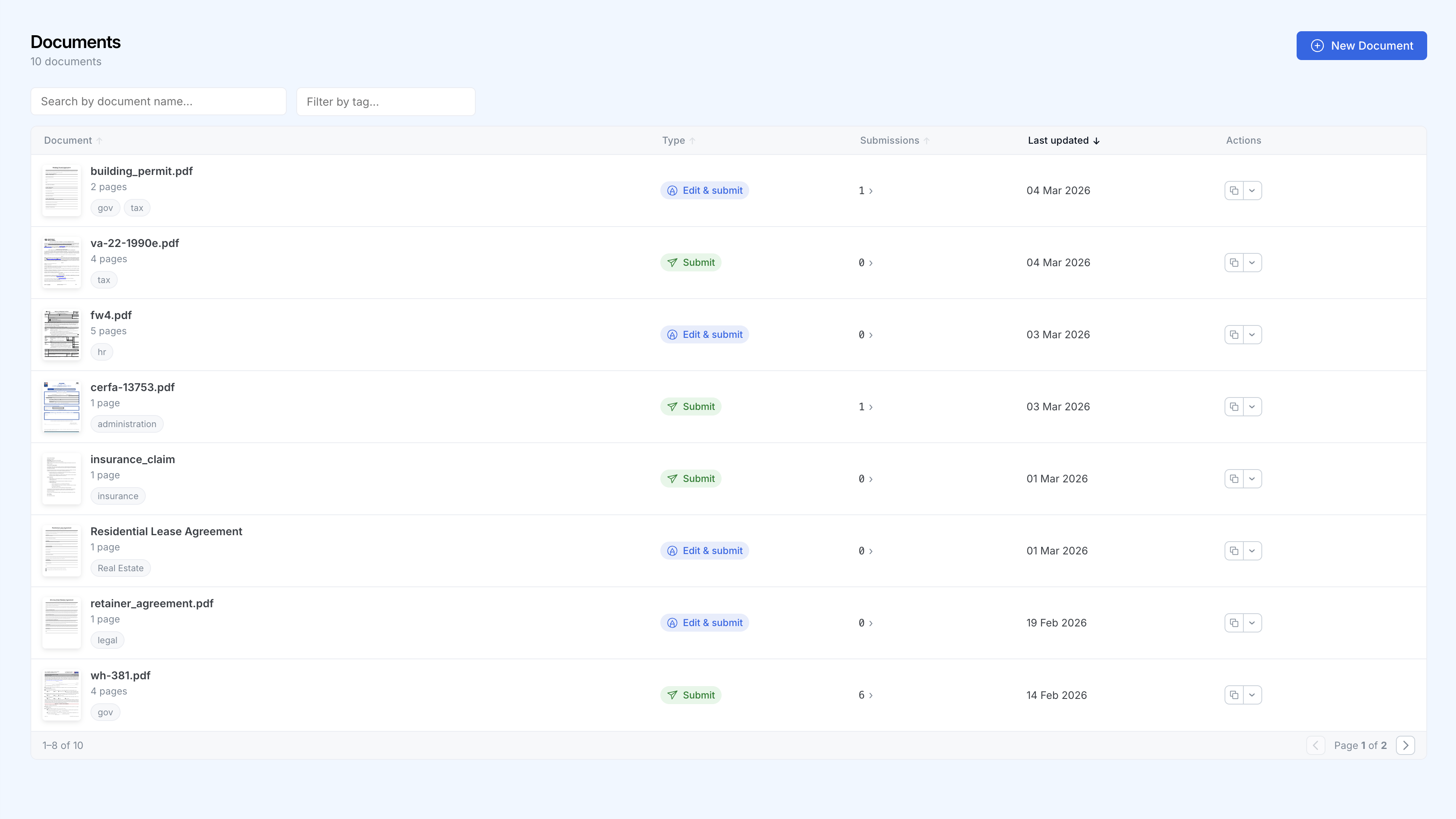
Al uw formulieren, één dashboard
Volg elk document, categoriseer en bekijk inzendingen in één oogopslag.
Zo werkt het
Upload uw PDF
Sleep een willekeurige PDF. SimplePDF herkent bestaande velden direct en detecteert ontbrekende velden met één klik, of voeg uw eigen velden toe in seconden.
Deel de link
Elk formulier krijgt een unieke URL. Deel deze per e-mail, integreer in uw website of voeg toe aan uw app.
Verzamel inzendingen
Inzendingen verschijnen in realtime in uw dashboard. Ontvang meldingen via e-mail of webhook en stuur gegevens naar uw favoriete tools.
Waarom teams kiezen voor SimplePDF
Geen programmeerkennis nodig
Iedereen in uw team kan formulieren aanmaken en beheren zonder een enkele regel code te schrijven.
Realtime meldingen
Ontvang een melding via e-mail of webhooks telkens wanneer een formulier wordt ingediend.
Privacy voorop
Documenten worden in de browser bewerkt, niet op een server. Bij het indienen gaan voltooide bestanden met Bring Your Own Storage (S3, Azure Blob Storage en SharePoint) rechtstreeks naar uw eigen opslag in plaats van naar de onze. AVG-conform en HIPAA-vriendelijk door architectuur.
Integraties
Verbind inzendingen met uw bestaande tools via webhooks, of gebruik uw eigen S3-, Azure- of SharePoint-opslag.
Vertrouwd door meer dan 100.000 mensen wereldwijd
"ONGELOOFLIJK behulpzaam en eenvoudige interface, heel erg bedankt."
"BEDANKT VOOR HET MAKEN VAN DEZE TOOL, WAUW."
"Je bent een redder in nood, dit verdient om overal te zijn."
"Fantastisch en eenvoudig te gebruiken."
"Het heeft me enorm geholpen en is sneller dan de meeste andere sites."
"Ik voeg uw site toe aan mijn bladwijzers voor toekomstig gebruik."