What's included in the SimplePDF Basic plan?

The Basic plan turns SimplePDF into a workflow product. Take any PDF, configure the fields you need filled, share or embed the form anywhere, and watch submissions land in your dashboard, your inbox, or your own systems.
Editing PDFs in the browser is and stays free. The Basic plan is for teams who need to collect what people fill in, route it where it belongs, and manage it at scale.
#Build forms people can actually complete, fast
Upload any PDF from your device. SimplePDF detects dozens of form fields in one click, including on scanned documents, and lets you drop new ones anywhere on the page: text, checkbox, signature, date, dropdown.
Each field can be configured for the way the form is meant to be used:
- Required: the form cannot be submitted until it is filled. Useful for IDs, signature blocks, and attestations.
- Default value: pre-fill the field for whoever opens the document. Useful for the date, a project reference, or any value the recipient should see filled in already.
- Read-only: the field renders as part of the document and cannot be changed. Useful when you have already signed the contract on your end and only need the counterparty's signature.
See the full guide on required, default, and read-only fields.
#Share a link or embed the form on your site
Once the form is ready, share it the way that fits the workflow:
- Direct link: copy a URL and send it by email, SMS, or any messaging tool. Recipients open it in the browser. No login needed.
- Embed on your app or website: drop the editor inside your own product or marketing site so the document is filled without leaving your domain.
For embedding, SimplePDF ships with first-party integrations for the most common stacks:
Browse them all on the integrations page.
#Prevent the editor from being accessed from untrusted websites
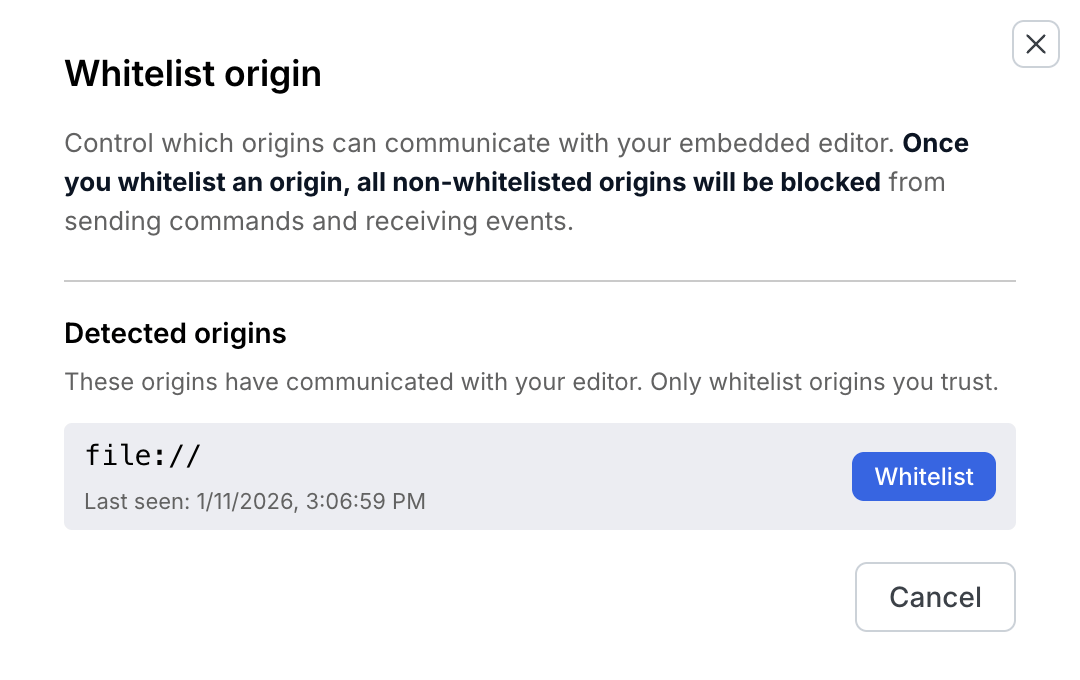
When you embed SimplePDF in your app, you control which origins can communicate with the editor. Your dashboard automatically detects every origin that has loaded your editor, and you decide which ones to whitelist. Once you whitelist any origin, every non-whitelisted origin is blocked from sending commands or receiving events from the editor.
For teams running SimplePDF inside a customer-facing product or an internal tool, this prevents anyone else from copying your embed snippet onto a third-party site and driving the editor under your account.
#Every submission lands in your dashboard
The moment someone fills a form, the submission appears in your SimplePDF dashboard. Open it to see the values, download the filled PDF, or hand it to a teammate.
The Basic plan removes the visible-submissions cap from the free tier. You keep every submission, no matter how many forms you process.
Name your submissions so you can tell them apart at a glance. In the editor, turn on "Use as submission name" for one field and every submission takes that field's value as its name, or rename any submission yourself from its details panel. The name shows in the dashboard list, the notification email, and the downloaded filename. See how to configure form fields.
#Email notifications when forms come back
Don't sit on the dashboard waiting for submissions. Pick the recipients, get the filled document in their inbox the moment a form is submitted. Useful for solo operators and small teams who want the document where their conversations already happen.
See the email notifications setup guide.
#Webhook notifications for your own systems
Fire an HTTPS request to any URL with the submission payload the moment a form is submitted. Plug it into N8N, Make, Zapier, or your own backend to trigger downstream automation: create a CRM record, push to a database, send a Slack message, kick off a contract.
See the webhook setup guide.
#Organize hundreds of documents with tags
Tags keep large document libraries searchable. Tag a document with a project, a client, a department, a year, then filter by tag to see only what you need.
The Basic plan includes 50 tags, which covers most teams managing hundreds of documents across departments.
#Up to 5 admins share the workspace
Bring up to 5 admins into the same workspace. Everyone sees the same documents, the same submissions, and the same tags. Useful when more than one person needs to handle the form library or follow up on submissions.
#Up to 2,500 documents and submissions per month
The Basic plan includes a monthly quota of 2,500 documents and submissions combined. A document is any file added to storage; a submission is a completed form coming back to you. Opening the same document multiple times only counts once, so a single intake form filled by ten users counts as eleven units (one document plus ten submissions).
At full plan volume the $99/month price works out to under 4¢ per document. Per-document APIs typically charge $0.10 or more per filled PDF, and e-signature tools $1 or more per envelope - SimplePDF bills a flat monthly price, never per document.
The quota resets at the start of each billing period. If usage approaches the cap, we notify you at 80% and 100%. Submissions in production are never blocked. See the pricing FAQ for the full quota mechanics.
For higher volumes, Pro covers up to 20,000 per month (under 2¢ per document) and Premium up to 75,000 (under 2¢ per document).
#Start your trial
Ready to turn your PDFs into a real workflow?
Start your 7-day free trial →That's it! With the Basic plan, every PDF you create becomes a working form: fillable, shareable, embeddable, and connected to the systems your team already uses.
If you have any questions, feel free to reach out to support@simplepdf.com